Filtering attributions for single-touch conversion attribution
- Overview
- Design
- Demo
Overview
Description
Problem Statement
Advertisers with multiple product lines want to attribute conversions to the correct campaign. This is especially important with user journeys involving interactions with multiple items or actions that aren't directly linked to a specific ad exposure. This complexity can lead to inaccurate measurement of ad effectiveness, making it difficult to determine the true return on investment (ROI) for advertising campaigns. The inability to filter out irrelevant engagements results in inefficient campaign optimization, as resources might be misallocated based on misleading conversion data.
Solution Overview
This use case demonstrates how advertisers can leverage the Privacy Sandbox Attribution Reporting API's filtering capabilities to achieve precise conversion measurement. The core challenge addressed is attributing conversions solely to views or clicks that correspond to the current product or item, effectively filtering out any irrelevant engagements. In this demo, we start by configuring specific filters during the initial ad interaction (source) registration. This ensures that only the subsequent conversion actions that involve this specific advertised item will trigger attribution reports. This granular filtering enables advertisers to gain a more accurate understanding of ad effectiveness by directly linking ad exposure to user engagement with particular products. The ultimate outcome is improved campaign optimization, enabling more efficient allocation of ad spend and a clearer view of campaign ROI.
Privacy Sandbox APIs
Related parties
- Publisher
- Advertiser
- Ad Tech (e.g. Demand Side Platform (DSP))
Design
Goals
The primary goal of this use case is to demonstrate the filtering feature of the Attribution Reporting API. This demonstration will show how to ensure that any conversion-related events, such as 'add to cart' and 'purchase' actions, are accurately attributed to the attribution sources of that specific product or item. Consequently, these filtered conversions will trigger both event-level and summary reports.
Assumptions
- The ad tech platform has integrated with the Privacy Sandbox Attribution Reporting API for source and trigger registration, and event level and summary report endpoints.
- The advertiser's website can identify the specific item by
itemId. - The ad tech platform can associate specific item identifiers with ad interactions during source registration.
Key Exclusions
- This demo will focus solely on the filtering mechanism for event-level reports and summary reports. Other filtering features of the Attribution Reporting API are out of scope.
- Complex filter logic beyond exact
itemIdmatching will not be covered in this basic demo. - Only shows click through conversion events as a showcase.
System Design
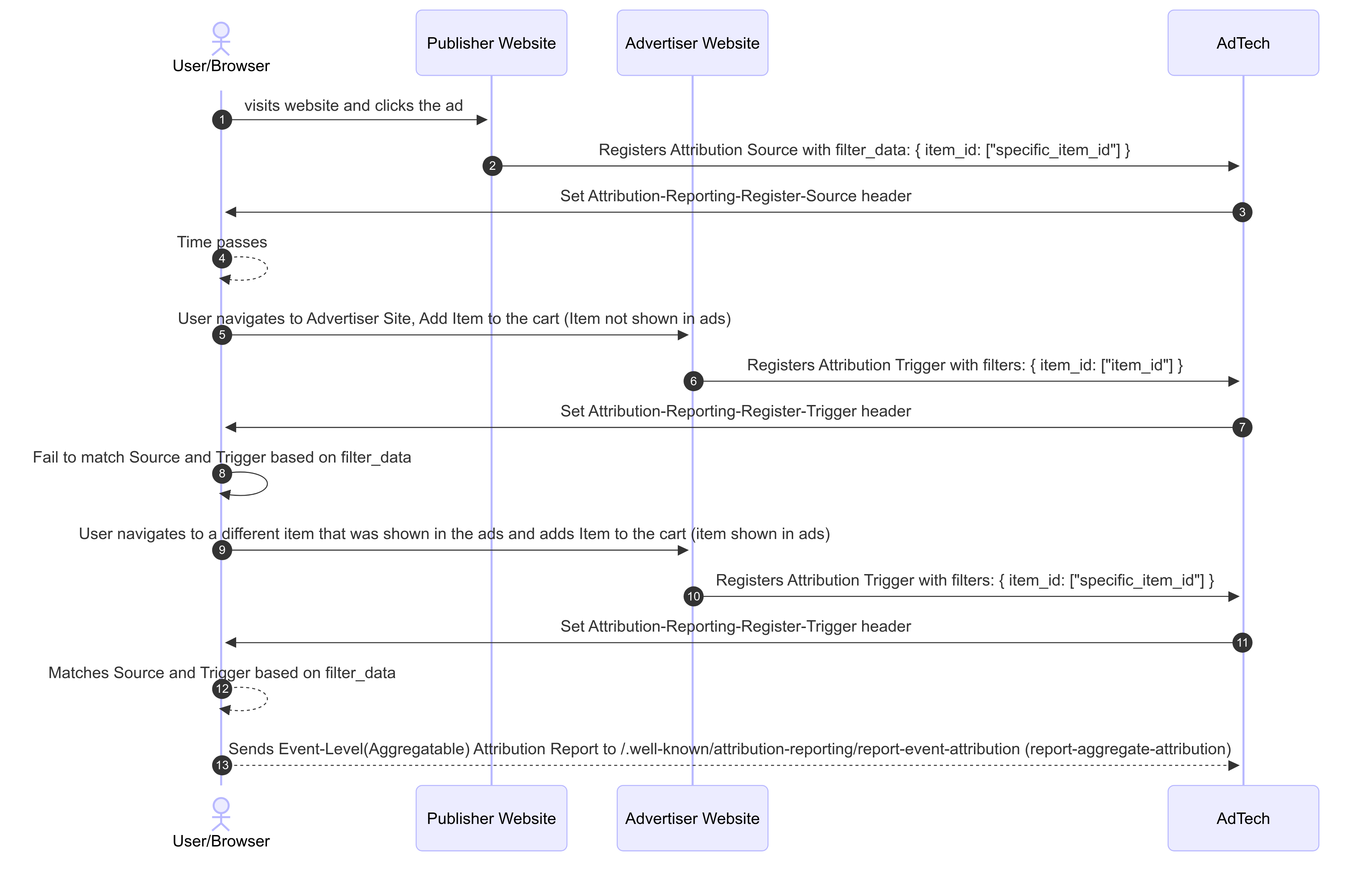
User Journey
- Source Registration with Filter Data: When a user clicks the ad, the ad tech registers a source with the browser, sending
filter_datawith theitem_idfor the products shown in the ad. - Trigger Registration with Filters: When the user later adds the advertised item to a cart and proceeds to purchase it, the advertiser's site
registers an attribution trigger with the browser. This trigger will include
filterscontaining theitem_idof the item added to the cart or purchased. - Browser-Side Filtering and Attribution: The browser, operating on the user's device, is responsible for matching sources to triggers. For a
match to occur regarding filters, for every key present in the trigger's
filters, that same key must exist in the source'sfilter_data, and their associated values must be identical. If a key in the trigger's filters does not exist in the source'sfilter_data, it does not block attribution, and the browser evaluates other matching conditions. - Report Generation and Delivery: Upon successful attribution that satisfies the filter conditions, the browser generates event-level and/or aggregatable reports and schedules them to be sent to the ad tech platform's designated reporting endpoints.
Demo
Prerequisites
- Latest stable version of Chrome (Open
chrome://versionto check). - Enable Privacy Sandbox APIs (Open
chrome://settings/adPrivacyand ensure "Ad measurement" is enabled).
Steps
Part 1: Set Up the Environment and Initial Interaction
- Clear attribution data in
chrome://attribution-internals/ - Navigate to news site
- a static ad will be displayed
- Click the ad and navigate to the item detail page of the shop.
Part 2: Test Items Not Shown in Ads
- Open the shop site from a new tab and click the item not shown in the ads.
- E.g. Women’s Sandal
- You can check the item ID from the URL
...shop.dev/items/{ItemId}
- Click the “ADD TO CART” button.
- Review “Trigger Registration” and "Event-Level Reports" tab in
chrome://attribution-internals- The trigger is registered but there will be no Event-Level Reports.
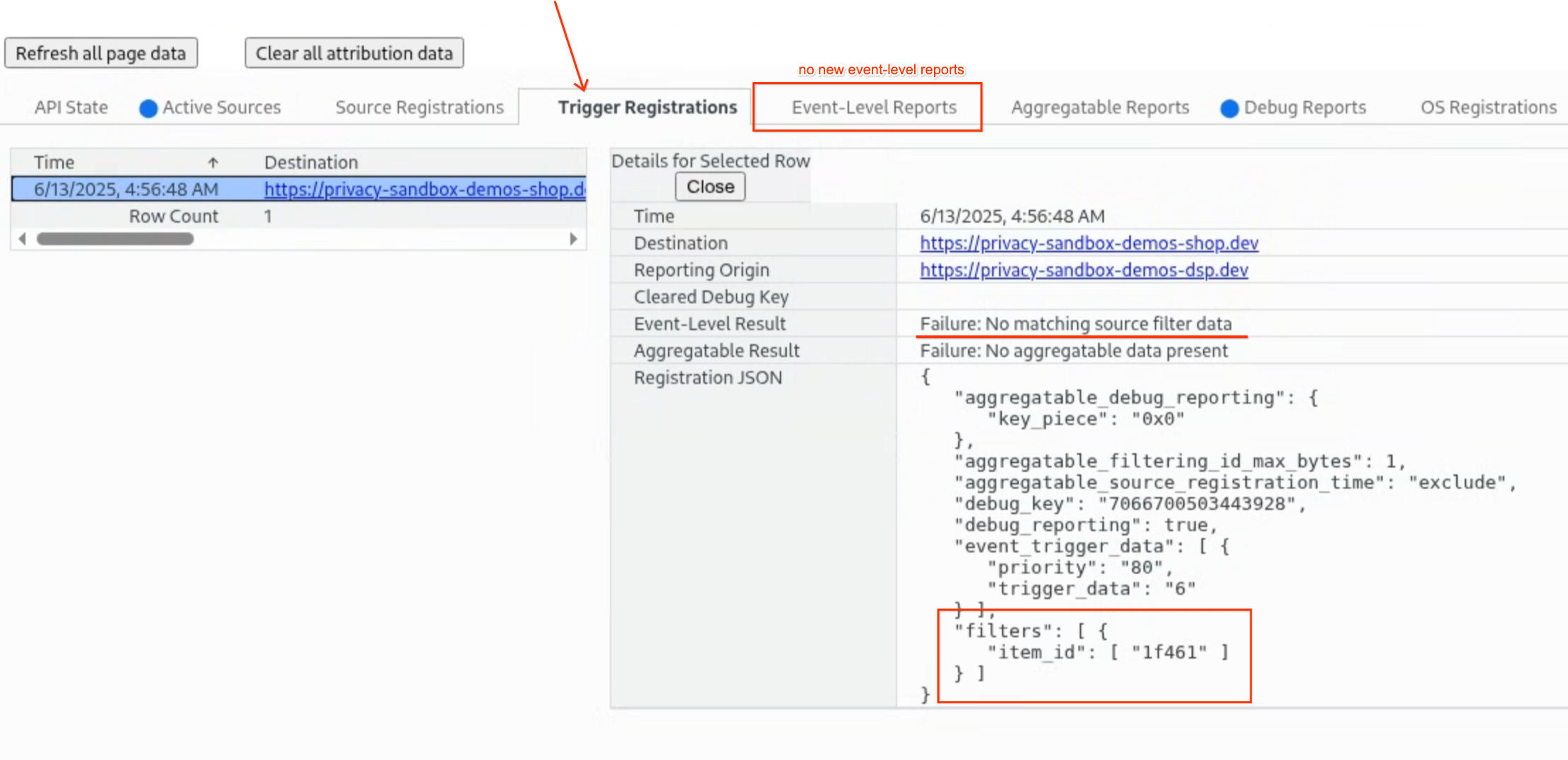
- The trigger is registered but there will be no Event-Level Reports.
Part 3: Test Items Shown in Ads
- Go back to the shop site opened from step 3 and click the “ADD TO CART” button.
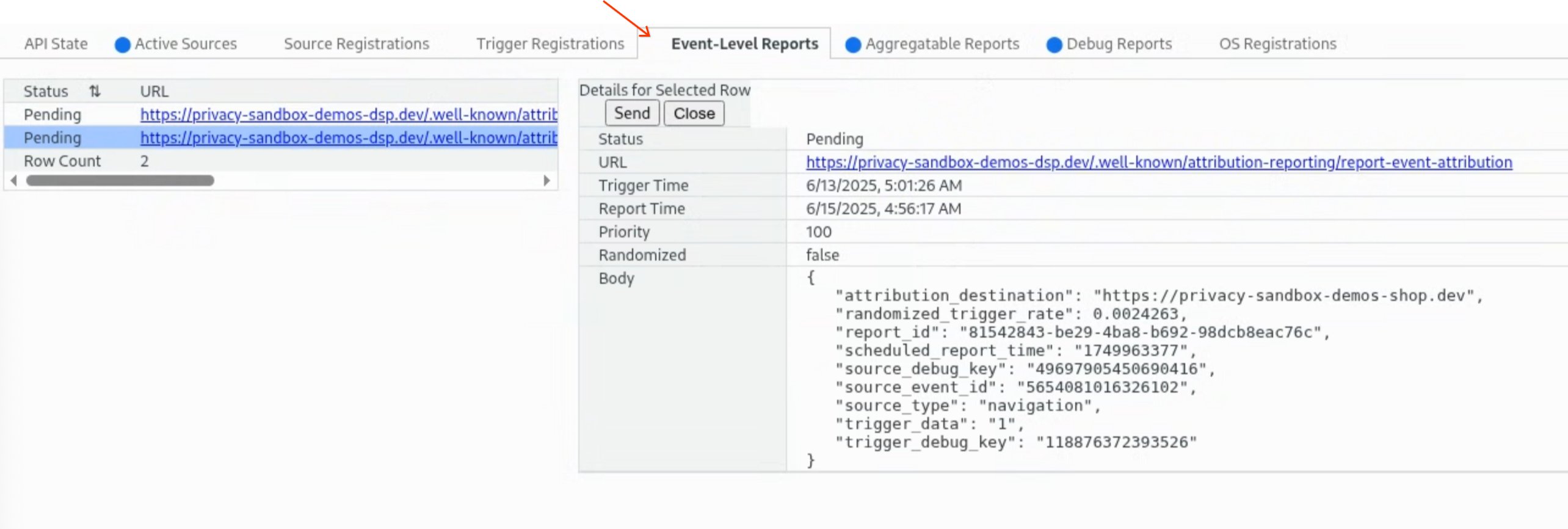
- Review “Trigger Registration” and "Event-Level Reports" tab in
chrome://attribution-internals- Both a trigger and an Event-Level Report are created.
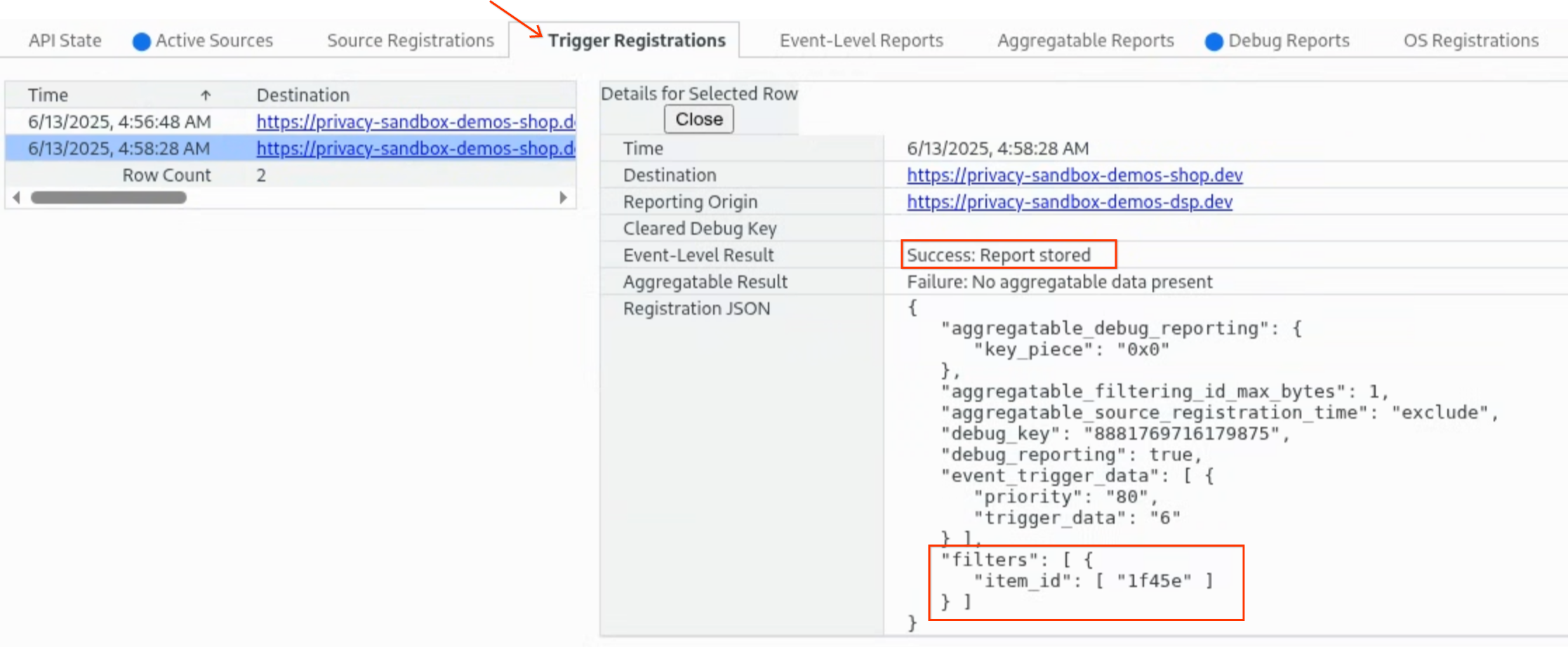
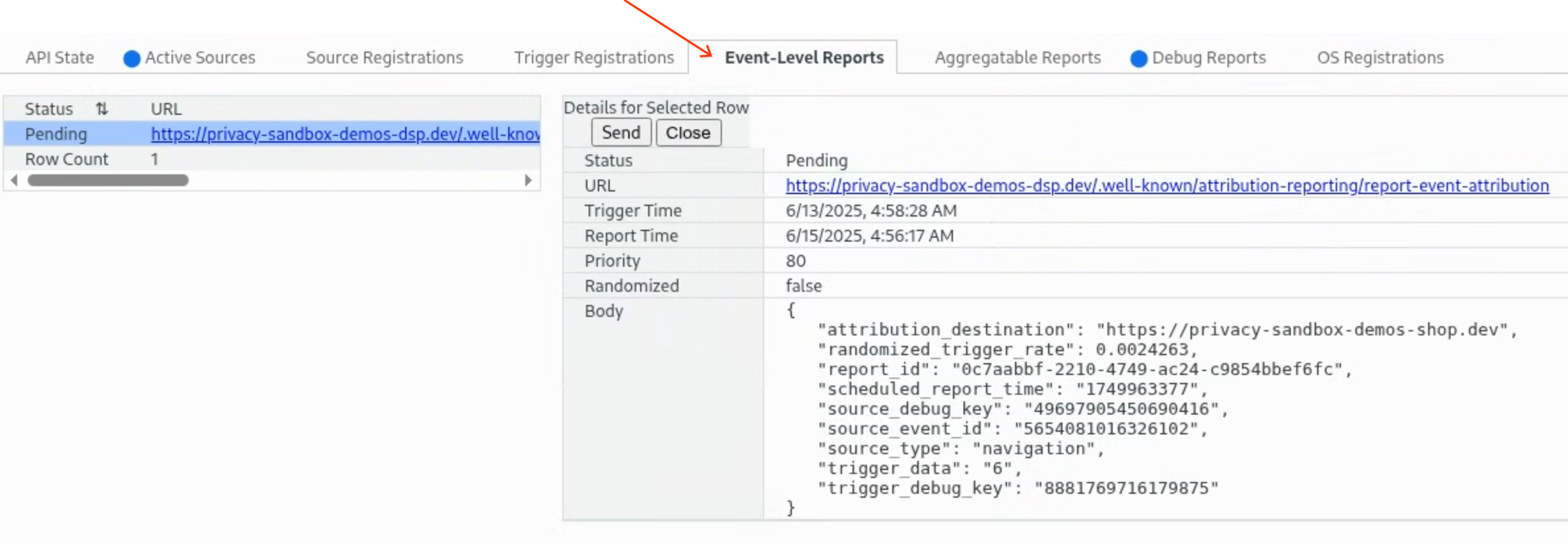
- Both a trigger and an Event-Level Report are created.
Part 4: Checking summary report (Optional)
- Go to the DSP report page and click the “Clear Report Cache” button at the bottom.
- Go back to the shop site and click the “BANK TRANSFER” button.
- Review “Trigger Registration” and “Aggregatable Reports” tab in
chrome://attribution-internals- Only the trigger for item ID
1f45eis reported.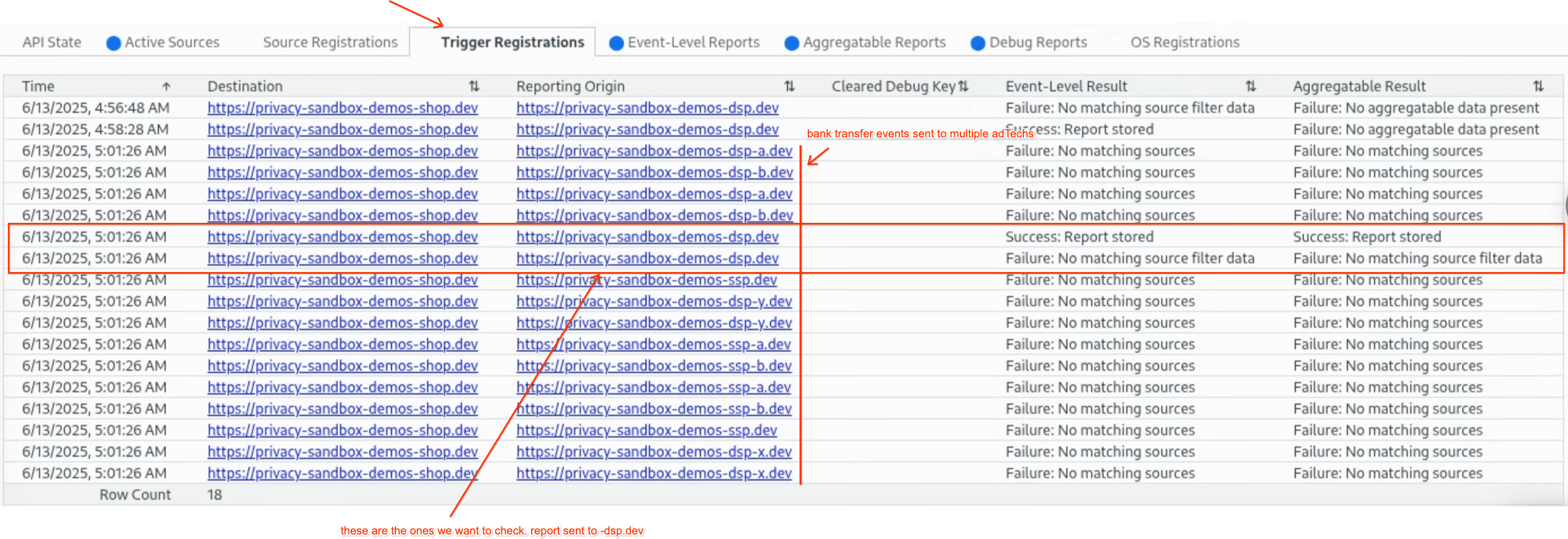
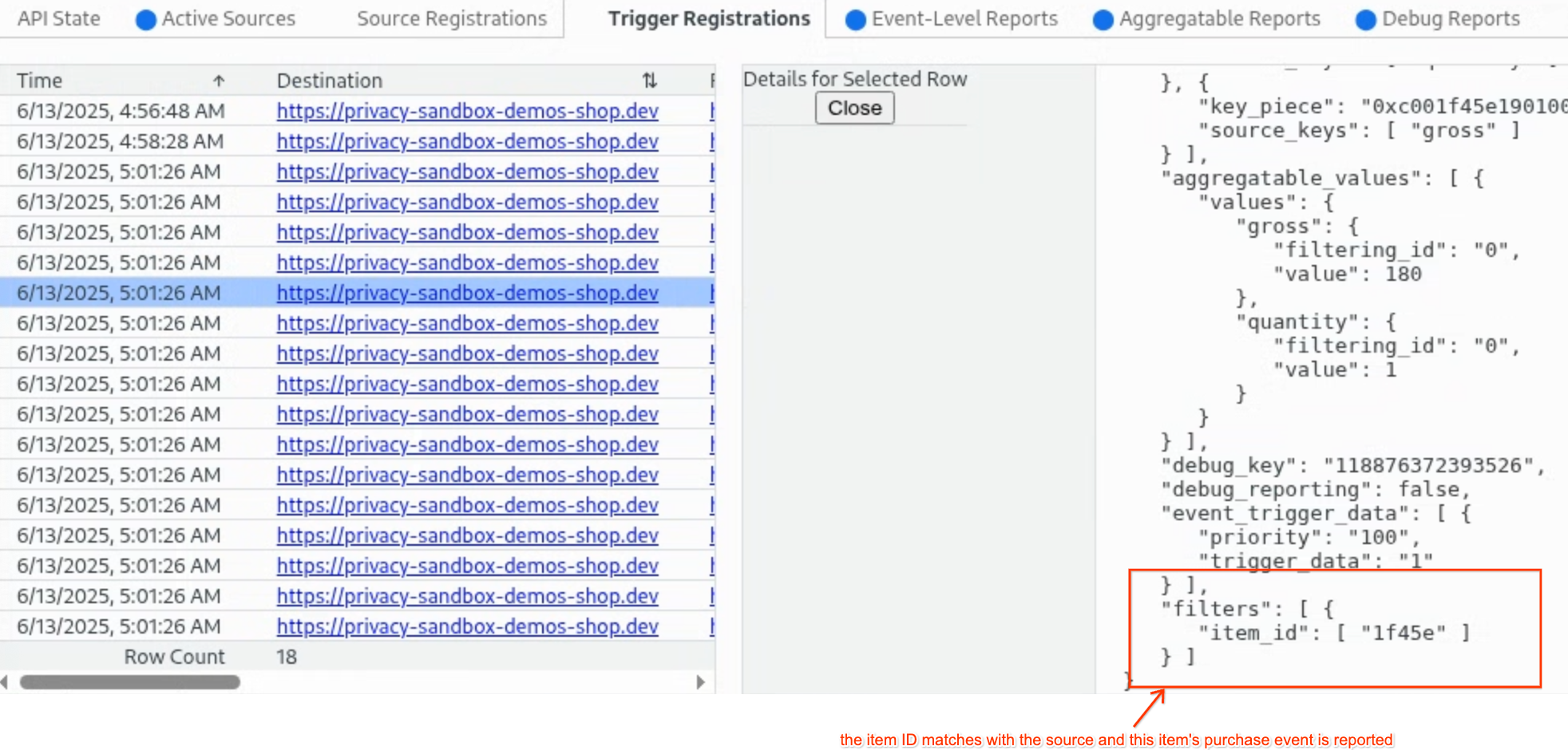
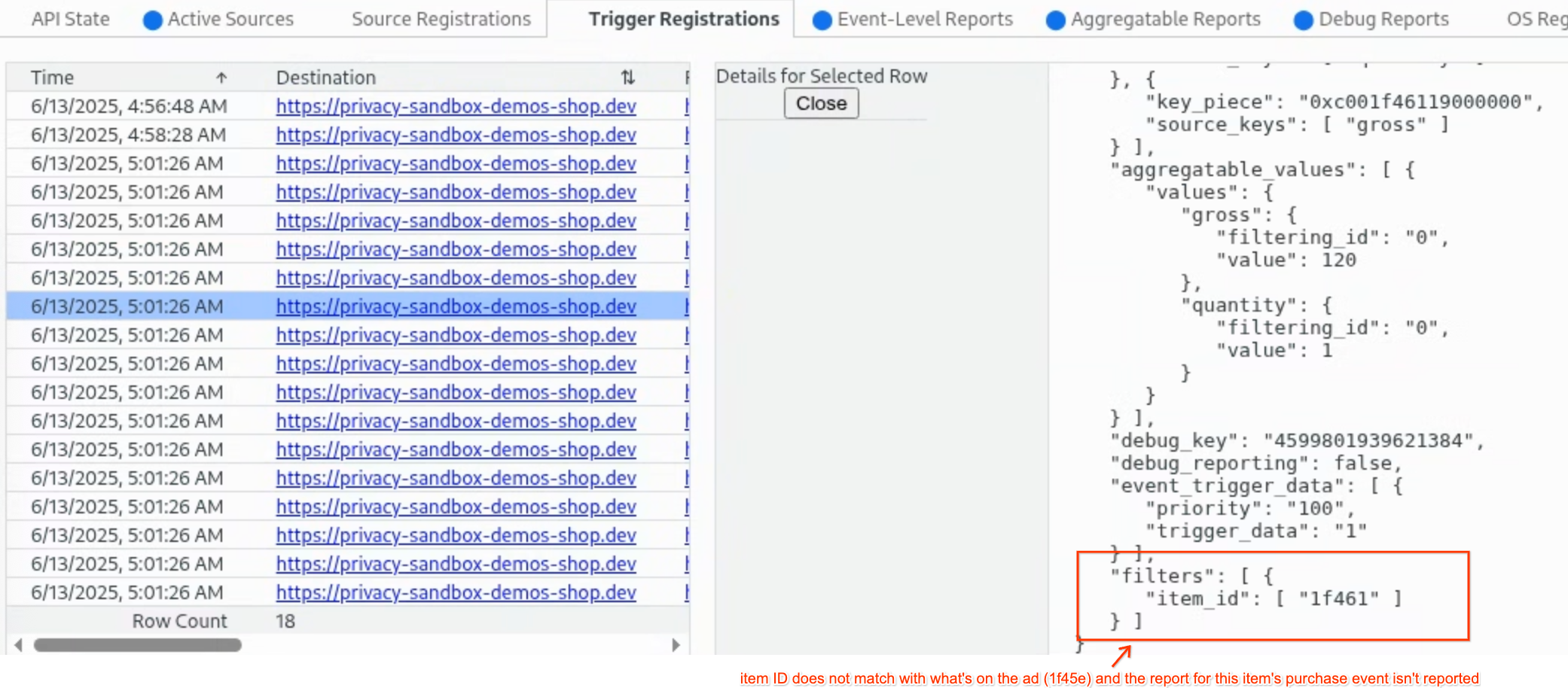
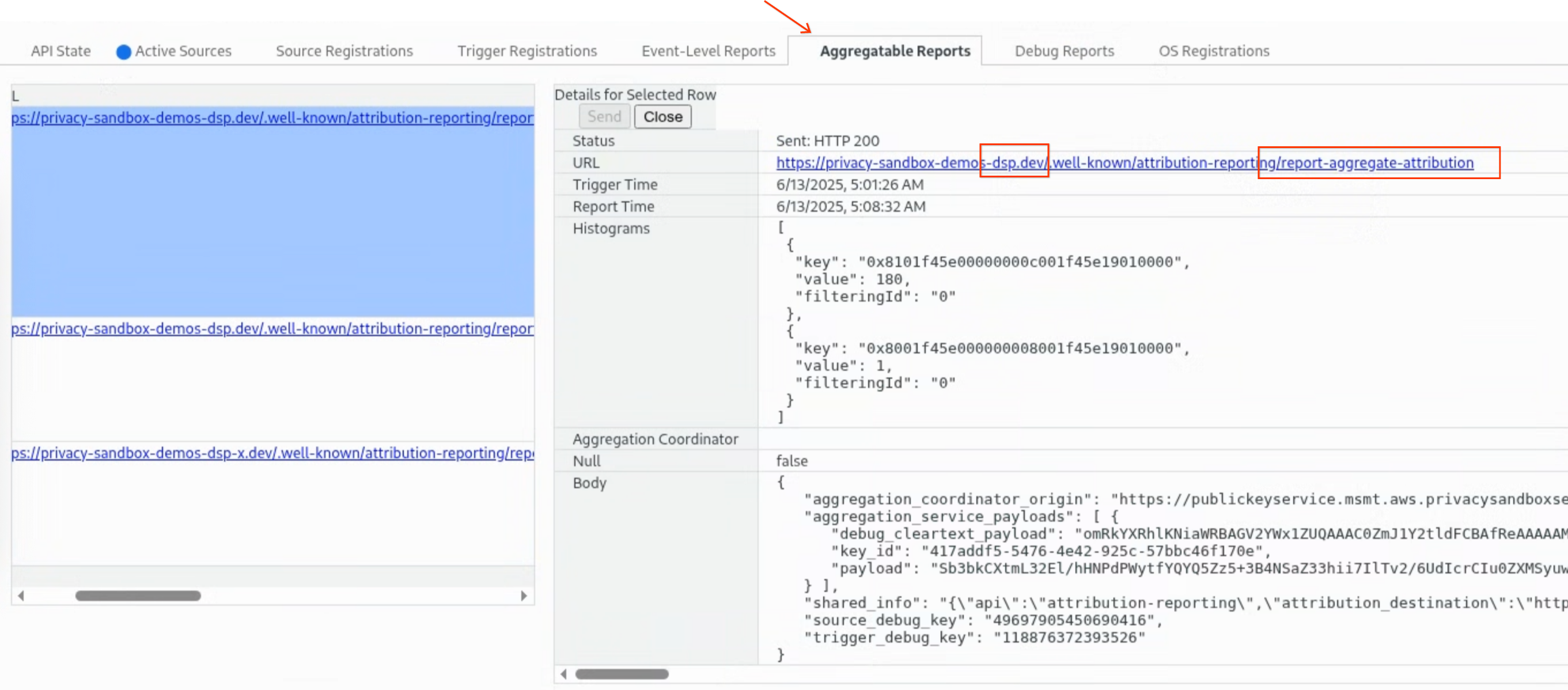
- Only the trigger for item ID
- Go back to the DSP report page and refresh the page.
- Check the summary report from the report page.
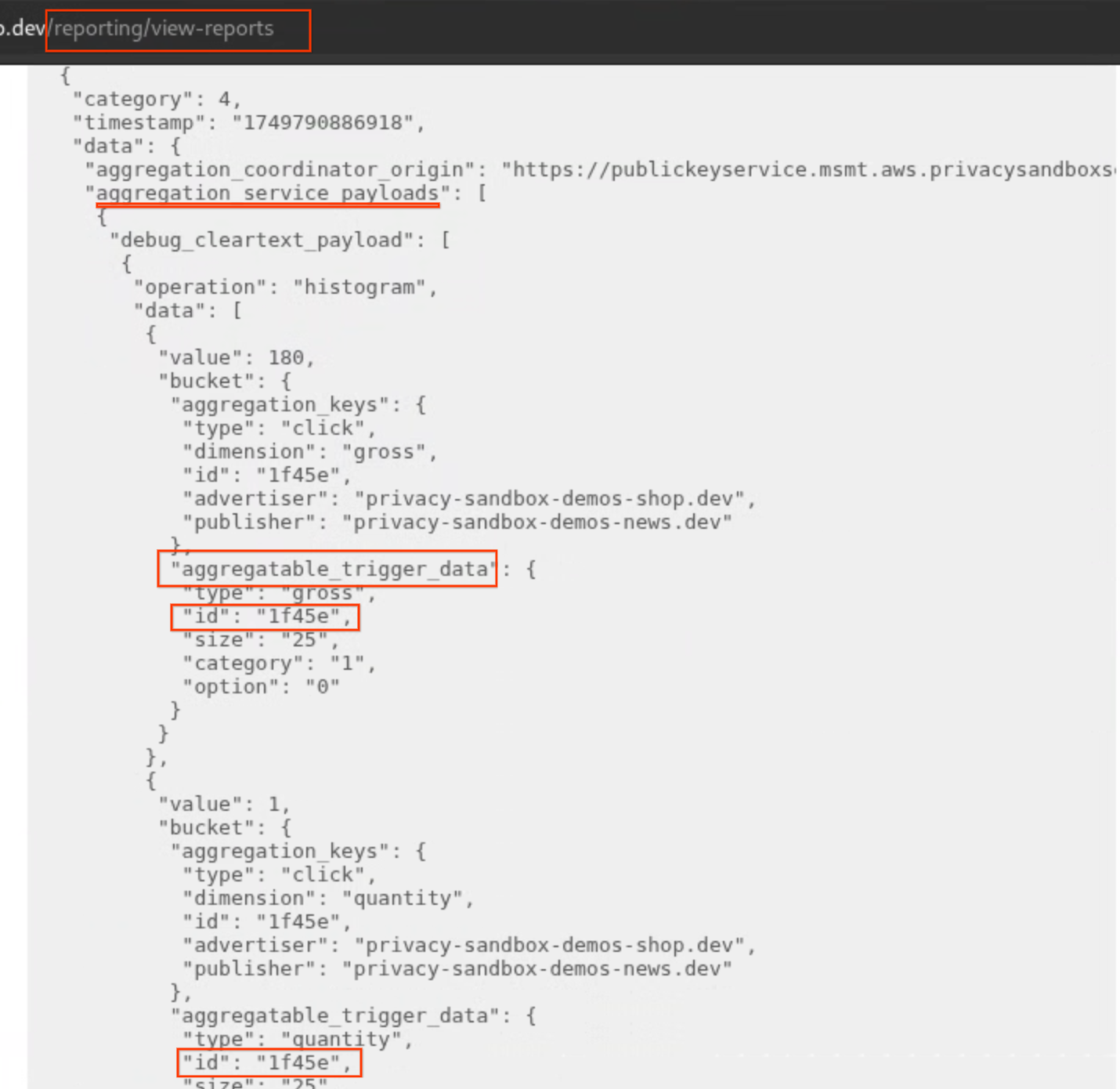
Implementation details
Register a source
The ad tech platform is responsible for ensuring that the correct item_id is dynamically included in the filter_data during source registration.
This item_id must correspond precisely to the specific product featured in the ad that the user interacted with, ensuring that only relevant
conversions are attributed.
// Initiate the source registration
<img src="https://privacy-sandbox-demos-shop.dev/image/svg/emoji_1f45e.svg" attributionsrc="https://privacy-sandbox-demos-dsp.dev/attribution/register-source?advertiser=privacy-sandbox-demos-shop.dev&itemId=1f45e">

// Complete the source registration in the server
// ...
   filter_data = {item_id: [itemId] };
// ...

// Attribution-Reporting-Register-Source header
res.set(
  "Attribution-Reporting-Register-Source",
  JSON.stringify({
    source_event_id: "EVENT_ID_123",
    destination: "https://privacy-sandbox-demos-shop.dev",
    filter_data,
    aggregation_keys: {}
    // ... other source registration parameters
  })
);
Refer to the real code for source registration with js here and source header creation here.
Register a trigger
The advertiser's website needs to ensure the item_id of the selected product is included during trigger registration.
// Trigger registration when add to cart button is clicked
<button type="submit" ... onclick="addToCart()">ADD TO CART</button>

// Initiate event level report trigger registration
function addToCart() {
      const registerSourceUrl = "https://privacy-sandbox-demos-dsp.dev/attribution/register-event-level-trigger?itemId=1f45e"
 // ...
      window.fetch(registerSourceUrl, {
        mode: "no-cors",
        keepalive: true,
        attributionReporting: {
          eventSourceEligible: false,
          triggerEligible: true,
        },
      })
    }

// Attribution-Reporting-Register-Trigger
// ...
const itemId: string = requestQuery['itemId'] as string;
const filters = {item_id: [itemId]}
// ...
res.setHeader(
  "Attribution-Reporting-Register-Trigger",
  JSON.stringify({
    filters: filters,
    event_trigger_data: []
    // For aggregatable reports
    aggregatable_trigger_data: [],
    aggregatable_values: {}
    // ... other optional trigger registration parameters
  })
);
Refer to the real code for event level report here and aggregatable report here.